
Live View
luotsi view opens a long-lived session that mirrors a connected Android device into a local SDL window while also emitting structured JSONL events on stdout.
luotsi view --device <serial> --preset safeluotsi view --profile deskluotsi view --last
Runtime path
Section titled “Runtime path”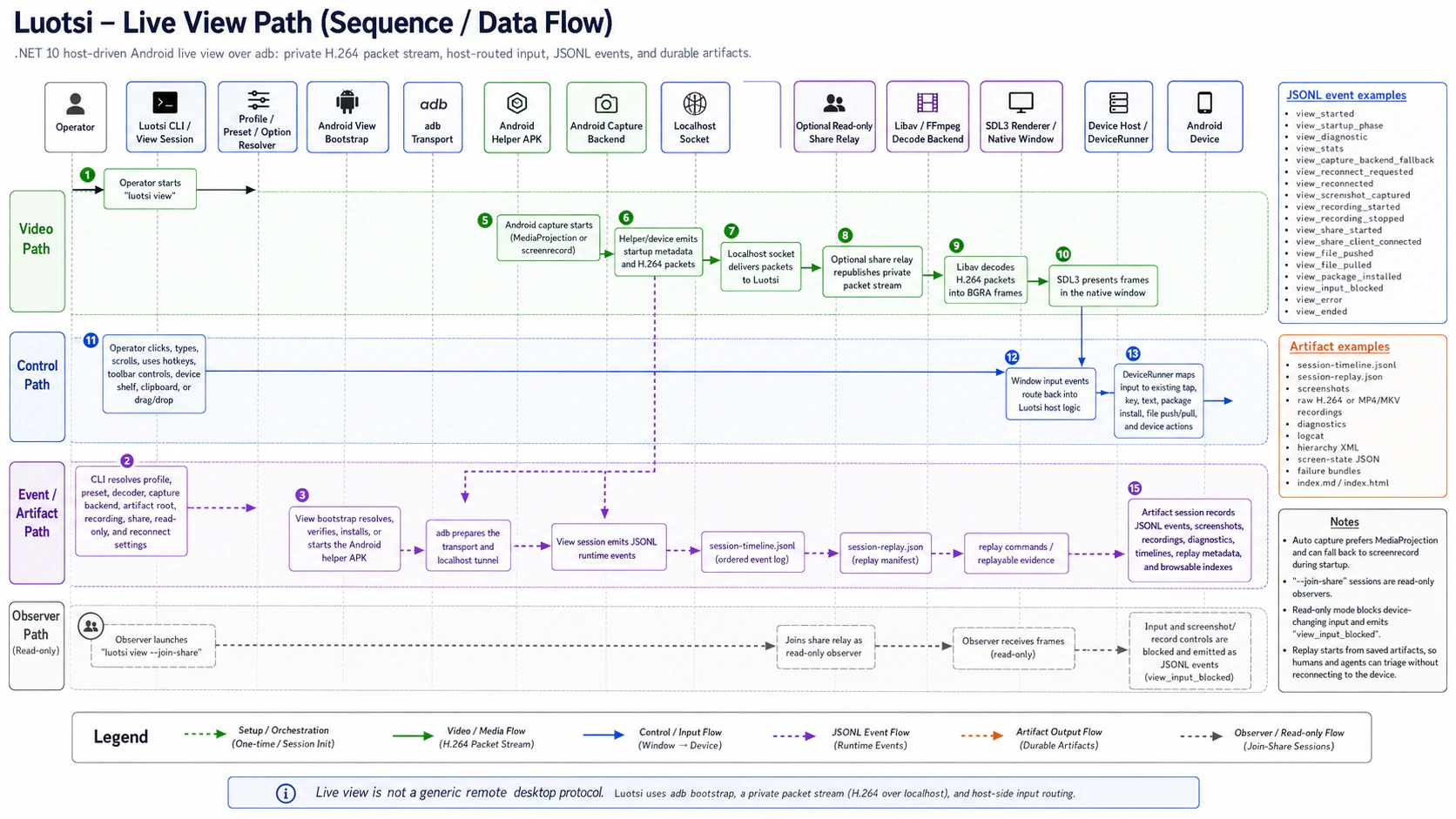
What it is good at
Section titled “What it is good at”- Local operator control with toolbar buttons and hotkeys
- Shared stream state for agents and CI via JSONL events such as
view_started,view_stats, andview_ended - Presets and profiles for repeatable view setups
- Artifact capture for screenshots, recordings, diagnostics, and replay metadata
Defaults that matter
Section titled “Defaults that matter”--preset safeis the conservative launch tuning--capture-backend autoprefers MediaProjection and falls back toscreenrecord--stats-interval-ms 1000controls JSONLview_statscadence, and0disables those periodic stats events--renderer-stats-interval-ms 0controls how often the local renderer/title consumes stats independently from JSONL emission--record <file.h264|file.mp4|file.mkv>chooses a startup recording target; raw.h264does not requireffmpeg, container outputs do- Artifact roots default to a timestamped temp directory unless you pass
--artifacts
Useful commands
Section titled “Useful commands”luotsi view setup --device <serial>luotsi view-doctor --device <serial>luotsi view-doctor --device <serial> --fixluotsi view --device <serial> --save-profile lab-deviceluotsi reconnect --profile lab-deviceUse view setup --dry-run when you want Luotsi to explain what it would stage without changing the selected device. Use view-doctor --fix when you want the diagnostic entry point to continue into setup/repair instead of only reporting readiness.
Operator controls that matter
Section titled “Operator controls that matter”F7opens the current artifact root so screenshots, recordings, and replay metadata are one shortcut away.F9toggles local recording and reuses the--recorddirectory and naming pattern when you supplied one at startup.F10or the help button reveals the in-window legend, which is the fastest way to teach a new operator the local shortcuts.- The toolbar mirrors the main hotkeys, and the multi-device shelf appears automatically when more than one adb-visible transport is available.
Session outputs that matter
Section titled “Session outputs that matter”Every view session is both a local operator loop and a replayable artifact source.
view_startedincludes the resolved artifact root, negotiated stream settings, and stats cadencesession-timeline.jsonlmirrors the session event stream into the artifact rootsession-replay.jsongives replay-oriented metadata for laterreplay summarize,replay capsule,replay timeline, orreplay opencommands- Screenshot, recording, share, and file-transfer actions emit their own JSONL events so CI or agents can track behavior without scraping terminal text
replay packet,replay open, andartifacts openall work against that same root after the session ends; start withreplay packetfor the production packet/check handoff, usereplay openfor replay-specific next actions, and useartifacts openwhen you specifically need the generic artifact browser
The higher-signal event families to watch are:
- startup and diagnostics:
view_startup_phase,view_diagnostic - stream health:
view_stats,view_reconnect_requested,view_reconnected,view_error,view_ended - local capture:
view_screenshot_captured,view_recording_started,view_recording_stopped,view_artifacts_opened - sharing and observers:
view_share_started,view_share_client_connected - operator and file actions:
view_clipboard_pasted,view_file_pushed,view_file_pulled,view_package_installed
Sharing and observer sessions
Section titled “Sharing and observer sessions”Source sessions can relay the live stream over TCP:
luotsi view --device <serial> --share-bind 0.0.0.0:9000luotsi view --join-share 192.168.0.10:9000Joined share sessions are forced into read-only observer mode. The stream renders, but input is blocked intentionally.
Observer-only windows also block screenshot and recording controls with view_input_blocked because the source session owns those device-facing capture operations.
Source sessions emit view_share_started when the relay is bound and view_share_client_connected when an observer joins. The shared transport also replays the cached bootstrap packets plus the latest keyframe to late observers so they do not connect into an undecodable stream.
The relay is intended for trusted lab or dev networks. It is raw TCP today, with no TLS and no authentication.
When to use something else
Section titled “When to use something else”- Use
inspectwhen you need structured JSONL snapshots and command loops instead of a live window. - Use scenario runs when you need repeatability, reports, and versioned playbooks.
Next steps
Section titled “Next steps”- Read Inspect and scenarios
- Read Replay and artifacts
- Read Troubleshooting